Sign up with:
Sign up with Facebook
Remember that you need to have the Facebook app installed on your smartphone to sign up this way.
1. After downloading the app, tap Create account on the app's main screen.
2. Tap Sign up with Facebook: a screen saying "Log in with the Facebook app" will appear. Select Open.
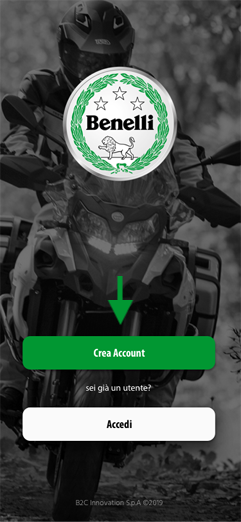
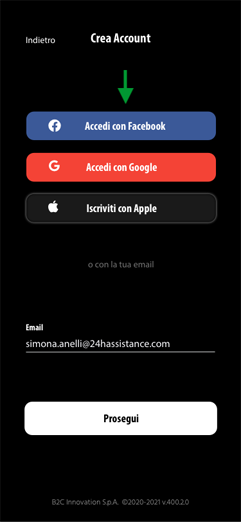
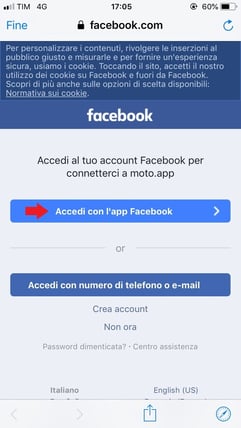
3. On the next screen you'll be asked to confirm access to myBenelli from your Facebook account. Click Continue as (your name) and you'll go straight back to myBenelli.
4. Enter your personal details (first name and surname) and your country of residence.
5. Set your communication preferences, accept the terms and conditions and activate your myBenelli account.
Now that you're registered, you can link your bike to your account!
Sign up with Google
Remember that you need a Google account to sign up this way.
If you use iOS
1. After downloading the app, tap Create account on the myBenelli main screen.
2. Tap Sign up with Google and you'll be redirected to the Google login page: enter your Google email address and tap Next
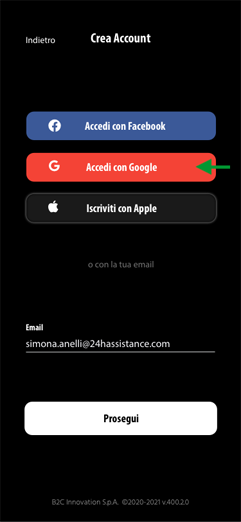
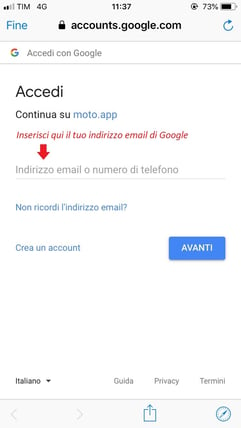
3. On the next screen, enter your Google account password and tap Next: you'll go straight back to myBenelli, where you'll need to confirm your newly created account.
4. Enter your personal details (first name and surname) and your country of residence.
5. Set your communication preferences, accept the terms and conditions and activate your myBenelli account.
Now that you're registered, you can link your bike to your account!
If you use Android
If you have a Google account linked to your Android smartphone, follow the procedure for iOS users. The only difference is that you won't need to enter your Google account password, because it's already linked to your smartphone.
Sign up with Apple
Remember that you need an Apple account to sign up this way.
1. After downloading the app, tap Create account on the myBenelli main screen.
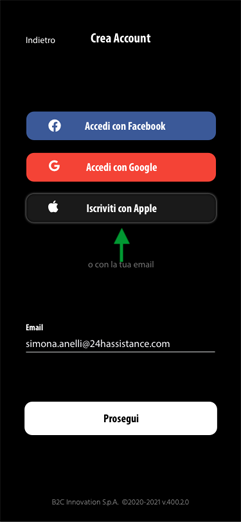
2. Tap Sign up with Apple.
3. Enter your personal details (first name and surname) and your country of residence.
4. Set your communication preferences, accept the terms and conditions and activate your myBenelli account.
Now that you're registered, you can link your bike to your account!